
Lazada lists product photos in a square grid, so 1:1 square images are the standard. Sellers commonly cite 500px as the floor and 1000px or larger as the safe target, at the time of writing. Keep the main image clean, with a plain background and no added text, and confirm the current rules in Seller Center before you upload, because Lazada changes them.
Square first: the shape that decides everything
Lazada shows products in square tiles. A wide or tall photo gets cropped to fit, and the crop is not always kind. Faces, shoe toes and bag straps are the usual victims. If your photo is not square, Lazada decides what stays in frame, and you do not get a vote.
Shoot or crop to 1:1 before upload. A 1000x1000px file is a solid target, and many sellers go to 1200x1200 or 2000x2000 for sharper zoom. The commonly cited minimum is 500px on each side, at the time of writing, but a file that small looks soft on a big screen. Treat 500px as the floor, not the goal.
JPEG is the safe format for photos, PNG for graphics with sharp lines. Keep each file small enough to upload without timing out. Very large files slow the listing form down, so if a file will not upload, check its size first, then its shape.
What Lazada wants on the main image
The first photo carries the listing. Lazada wants it clean: the product on a plain, light background, filling most of the frame, with nothing else competing for attention. Added text, price badges, logos, watermarks and borders are the usual reasons a main image gets flagged or quietly buried in search.
Secondary images have more room. Use them for angles, close-ups of stitching or material, size references, and what is in the box. A short sequence works well: front view, side view, detail, scale shot, package contents. Each one answers a question a buyer would otherwise ask in chat.
At the time of writing, most listings allow up to 8 images. That number has changed before, so check Seller Center if you plan a long gallery. Eight well-chosen photos beat fifteen near-duplicates, and they load faster on a phone connection too.
Getting your files right before upload
A quick pre-flight check saves a rejected listing. Open each image and confirm three things: it is square, it is at least 1000px on each side, and the product fills the frame with a small margin around it. Then check the file size. If it is several megabytes, compress it. Free tools like Squoosh, or your photo editor's export settings, can cut a JPEG to a few hundred kilobytes without visible loss.
Name files so you can find them again. A folder per product, with files named by angle, beats a Downloads folder full of IMG_4821.jpg. This matters more than it sounds: when a supplier sends a corrected photo six months later, you want to know which file it replaces.
If you sell the same product on several marketplaces, keep one master set at full size and export per-platform copies from it. Lazada, Shopee and TikTok Shop each crop a little differently, and a master file lets you re-crop instead of re-shooting.
Doing it with HiRes
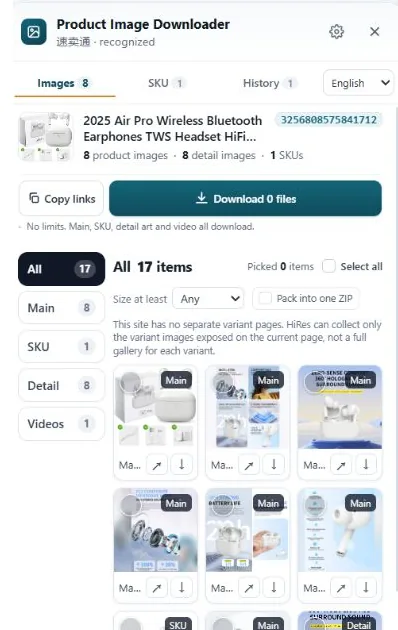
Before you upload, it helps to see what other sellers actually use. HiRes works on Lazada product pages: open a listing, click the HiRes button, and the panel groups the images the page exposes, main gallery first. Save a few competitor photos and check their size and shape with the guide on how to check a product image's size. You will see quickly that the best-looking listings use square, high-resolution files, and the weak ones do not.
Use those downloads for research only. The photos belong to the seller who shot them, so do not publish them in your own listing. Study the framing, the background and the angles, then shoot your own version.
A note on reusing images. Downloading a competitor's photo to study it is normal research. Publishing it in your own listing is not. Lazada can remove listings that use another seller's images, and the complaint usually lands after you have already made sales. Shoot your own, or get written permission first.
Questions people ask
What size should Lazada product images be?
Square, 1:1, at 1000px or larger on each side. Sellers commonly cite 500px as the minimum, at the time of writing, but 1000px is the safer target for sharp display and zoom. Confirm the current numbers in Seller Center before you upload.
How many images can I add to a Lazada listing?
Most listings allow up to 8 images, at the time of writing. Use the slots for different angles, close-ups and a scale shot rather than near-duplicates of the same view. If the limit has changed, Seller Center shows the current number.
Does the main image need a plain background?
Yes, keep the first photo clean. Lazada wants the product on a plain, light background with no added text, logos, watermarks or borders. Save text and badges for the secondary images, or leave them out entirely.
Can I check the image size on a live Lazada listing?
Yes. Open the listing in Chrome, save the image or open it in a new tab, and check its dimensions in your photo viewer or with the steps in our size-check guide. HiRes can pull the listing's images into one panel so you can save and measure them faster.
Skip the right-click routine
HiRes gathers the gallery and detail images from the Lazada page you are already on, in one panel. Free for individual downloads, no account needed.
Get HiRes for Chrome