
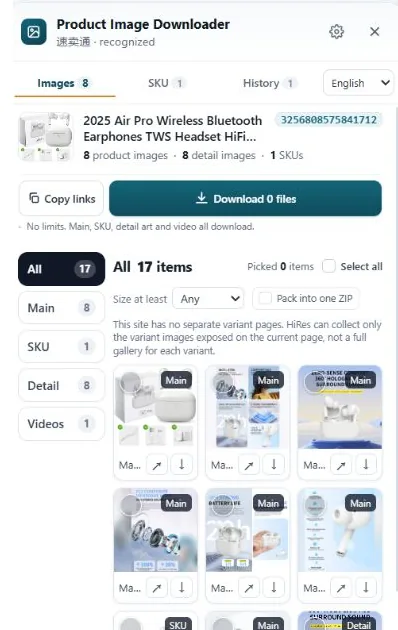
Before a product image set goes live, check ten things: the files are big enough for zoom, the main image follows its marketplace's rules, every variant has a correctly labeled photo, the detail images are in the set, the formats are ones the listing form accepts, the file names say what each photo is, you have permission to publish, and the untouched originals are stored safe.
Size, zoom and the main image (checks 1 to 4)
Most image problems exist before you open the listing form: a too-small file can't be fixed by the uploader, and a rule-breaking main image gets flagged or quietly suppressed in search.
- The files are big enough for zoom. On Amazon, zoom kicks in at 1000px on the longest side, and 1600 to 2000px is the safer target. eBay recommends 1600px on the longest side. Etsy asks for at least 2000px on the short side. AliExpress sets the bar at 1000x1000 or larger. Check pixel dimensions, not kilobytes.
- The main image background is right. Amazon wants the main image on pure white, RGB 255, 255, 255. Not cream or light grey. AliExpress prefers a white or clean background on the first image. A supplier main shot on a beige backdrop needs editing or replacing first.
- Nothing extra has been added to the main image. eBay doesn't allow borders, artwork, seller watermarks or promotional text added to photos. Amazon's main image follows the same logic: no text, no badges, no props that aren't part of the product. A supplier's "HOT SALE" corner banner has to go.
- The first photo survives the search crop. On Etsy, listing photos get cropped to a wide ratio in search results, so a tall, tightly framed photo can lose its top and bottom where buyers decide whether to click. Compose it with the product centered, breathing room around it, and preview the crop before you commit.
Rules shift. Treat these as the working numbers at the time of writing, and confirm them in your seller center when a listing gets flagged.
Coverage: every variant, and the details too (checks 5 to 7)
Size problems get listings rejected. Coverage problems get products returned. If the red option shows the blue photo, or the size chart is missing, buyers find out after delivery.
- Every variant has its own photo. Count the options, then count the variant photos. The numbers should match. It fails most often on the option that sells least, right up until someone orders it.
- Each variant photo is labeled with the right option. Twelve photos isn't the same as knowing which one is "Green, 350ml". Check the label against the actual photo, not against download order. One swapped pair means steady "wrong item sent" messages.
- The detail images are in the set, not just the gallery. The gallery sells the product. The detail images (size charts, close-ups, dimension diagrams, instruction shots from the description) answer the questions that stop a return. Gallery-only? Get the description images too.
Formats, file names and rights (checks 8 to 10)
The last three save you at 11pm, when you're re-uploading a corrected set and can't tell the files apart.
- The formats are ones the listing form accepts. JPG is the safe default everywhere; Amazon also takes PNG, TIFF and GIF, and prefers JPEG. WebP is the trap: supplier sites serve WebP files, and some listing forms refuse them or convert them badly. If a file ends in .webp, convert it to JPG and check the copy at full size.
- The file names say what the photo is. Rename IMG_2041.jpg to something a tired human can read, like ceramic-mug-green-350ml-main.jpg: product, option, slot. It pays off when you search your folders, re-upload after an edit, or hand the set over.
- You have permission, and the originals are kept. Anything customer-facing needs to be your own photo, or one you have permission to publish, ideally in writing. Keep the untouched originals in a master folder, separate from the resized copies. When size rules change, you'll want the biggest clean version, not last year's 1000px copy.
Where this checklist fits when you collect with HiRes
Coverage is where the time goes on a collected set, and that's the part HiRes speeds up. On any of the 8 marketplaces it supports, open a product page and the panel shows the images grouped: main gallery, variant images with their option labels where the page provides them, and detail images. A missing color shows up as a gap in the variant group, not as a return later.
Individual downloads are free, with no daily product cap and no account needed. Everything runs locally, so files go straight from the marketplace to your Downloads folder. Two honest limits: HiRes can only save what the page loads, so click a variant first if its photo appears only on selection, and Etsy doesn't always say which option a photo belongs to, so those come down unlabeled rather than guessed. Then run checks 1 to 10 on the folder before it goes near a listing form. ZIP packaging and resizing are in Pro, a one-time $19, if you do this daily.
Questions people ask
How many images should a product listing have?
Most marketplaces give you more slots than sellers use: eBay allows up to 24 photos in most categories, Etsy gives you 10, and AliExpress takes 6 gallery images plus separate SKU photos. A solid set: clean main image, one photo per variant, a few angles, and detail shots covering size and material. Six to ten good files beat twenty duplicates.
What gets a product image rejected by a marketplace?
The usual triggers are a main image that isn't pure white where the marketplace requires it, borders, watermarks or promotional text on a photo, files under the minimum size, and images you lack the rights to publish. A wrong-variant photo rarely gets rejected, but it earns returns and complaint messages.
Should I rename image files before uploading them?
Yes. Rename before upload, while you still know which file is which. A name like blue-ceramic-mug-350ml-main.jpg tells you product, option and slot at a glance, and stays readable in your folders and listing tool. IMG_2041 tells you nothing, and it's how the blue mug ends up on the green listing.
Do I need permission to use supplier photos in a listing?
If a customer will see the photo, treat it as publishing, because it is. Supplier and brand photos belong to whoever made them. Use them live only with permission you can point to, ideally in writing, or shoot your own. Downloads are fine for research, specs and mockups meanwhile.
Collect the set, then run the checklist
HiRes gathers the main, variant and detail images from the product page you're on, grouped and labeled, so coverage takes a glance, not an afternoon. Free for individual downloads, no account needed.
Get HiRes for Chrome