
Walmart wants product photos on a clean white background, at least 2000px on the long edge at the time of writing, in JPEG or PNG, with no text, logos, or watermarks added. Check the current numbers in Seller Center before you upload, because Walmart updates its rules without much warning.
The size rules
Start with size, because it is the rejection sellers hit most. At the time of writing, Walmart recommends 2000px on the long side, with 500px as the minimum. Images below the minimum get rejected or look soft in the zoom view, and a 2000px file is what makes zoom actually useful to a buyer.
Square images are the safe default. Walmart crops and displays photos in square frames in most places, so a square file shows the way you composed it, while a wide or tall file gets cropped in ways you did not plan. JPEG and PNG are the formats to use, at the time of writing.
Walmart also caps the file size, so check the limit Seller Center shows before you upload. A clean JPEG export at quality 80 to 90 usually lands well under it. And do not upscale a small file to 2000px and call it done: stretching a 600px photo invents pixels, and the result looks worse, not better. If the original is small, reshoot or ask the supplier for the real file.
The white background rule
The main image must sit on a pure white background, RGB 255, 255, 255, with nothing else in the frame. No shadows baked into the backdrop, no table, no floor, no room. The product itself should fill most of the frame, at the time of writing Walmart's guidance puts the product at 85% or more of the image, so a buyer sees the item, not the empty space around it.
This is the rule that trips up sellers moving over from other marketplaces. A photo that passed on eBay or Etsy, shot on a kitchen table with a nice shadow, will not pass here as a main image. Keep that shot for the extra images, and shoot or cut out a clean white-background version for the main slot.
What the main image may not contain
The main image is the product and nothing else. At the time of writing, Walmart does not allow text, logos, watermarks, borders, badges, or promotional claims baked into the main image. No "free shipping" banner, no "best seller" ribbon, no brand logo floating in the corner.
Props are out too, unless the prop is part of the product itself. A phone case photographed on a phone is fine, because the phone shows scale and use. A phone case photographed next to a coffee cup and a pair of sunglasses is not, because the buyer cannot tell what is for sale. The same goes for lifestyle scenes: save those for the extra image slots, where they are welcome.
How many images, and what the extras are for
At the time of writing, Walmart lets you add up to 8 images per item. Use them, because the first image is only the thumbnail a buyer sees in search. The rest answer the questions that decide the sale.
A set that works for most products: the main white-background shot, two or three angles, a close-up of the detail buyers ask about, a shot that shows scale next to a common object, and one or two lifestyle shots of the product in use. Order matters, so put the angle that answers the most common question second, not last.
Common rejections and how to check your files
Most rejections come down to four things: the file is below the minimum size, the background is not pure white, text or a watermark is baked in, or the product is too small in the frame. Check each file before you upload, not after the listing gets flagged.
Three quick checks catch most of it. First, open the file and read its real pixel size, right-click and check properties, or open it in any image viewer that shows dimensions. Second, zoom into a corner of the background: if it is off-white or grey, it will fail. Third, look at the whole set at thumbnail size, the way a buyer sees it in search, and ask whether the product is obvious in every shot.
Doing it with HiRes
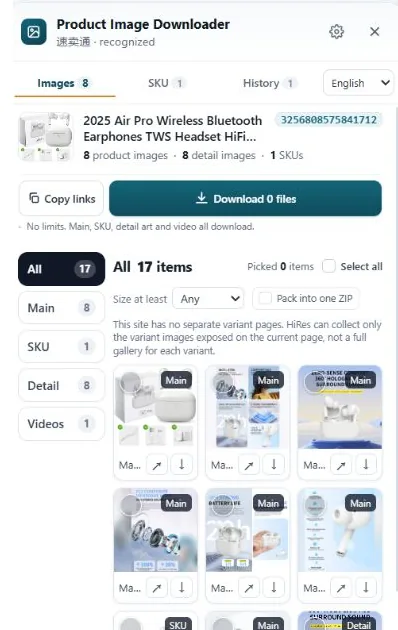
Before you shoot or re-export, it helps to see what the listings around you are doing. Open a competing Walmart product page and HiRes lists the gallery and variant images the page exposes, grouped and ready to save one by one for free, with no account needed. Compare their sizes, backgrounds, and angles against your own files, and the gaps show up fast.
Pro is $19 one-time and adds ZIP packaging, product video downloads, image resizing and JPEG quality controls, expanded batch export, and long-term history. Everything runs locally in your browser, and the images go straight to your Downloads folder.
A note on reusing images. Walmart changes its image rules from time to time, and the numbers here are correct at the time of writing. Confirm the current size, format, and background rules in Seller Center before you upload. This guide is practical experience from seller work, not Walmart's official text.
Questions people ask
What size should Walmart product images be?
At the time of writing, Walmart recommends 2000px on the long side, with 500px as the minimum. Images below the minimum get rejected or look soft in zoom. Confirm the current numbers in Seller Center before you upload.
Does the main image have to be on a white background?
Yes. The main image should sit on a pure white background with nothing else in the frame: no text, no logos, no watermarks, no borders, no props. Extra images can show the product in use.
How many images can a Walmart listing have?
At the time of writing, Walmart lets you add up to 8 images per item. Use them: the main shot, the angles that answer buyer questions, and one or two lifestyle shots.
What file formats does Walmart accept?
JPEG and PNG are the safe choices, at the time of writing. Keep files under the size limit Seller Center shows, and check each file's real pixel size before you upload, because a small file stretched to 2000px will look worse, not better.
Check your files against the listings around you
HiRes gathers the gallery and variant images from the Walmart page you are already on, in one panel. Free for individual downloads, no account needed.
Get HiRes for Chrome