
Shopee wants square photos, at least 500 pixels on a side, and 1024 by 1024 is a safe working size. No watermarks, no promotional text pasted over the product, and the first photo carries the listing. Confirm the current numbers in Seller Centre, since Shopee changes them.
The size rules, at the time of writing
Shopee's image rules are simple, and that is exactly why they catch people out. Product photos must be square, 1:1, at least 500 pixels on a side, and each file has a size cap shown in Seller Centre. A 1024 by 1024 square is a safe working size: sharp in the app, sharp on desktop, and small enough to upload without a wait. Confirm the current numbers in Seller Centre, since Shopee changes them.
Square is not a suggestion here. Shopee shows product photos in square tiles everywhere: search, recommendations, the cart. A wide photo gets cropped to a square whether you like it or not, usually from the middle. If your product sits near the edge of a wide shot, the crop cuts it. Shoot square, keep the product centred, and leave margin around it.
How many photos can you add? Shopee allows up to nine images per listing, plus a product video where the category supports it. Nine is plenty for most products: front, angle, back, detail, size chart, packaging, and one or two lifestyle shots. A listing with two photos looks thin next to a competitor with nine, and shoppers notice.
What gets a listing rejected
Shopee reviews listing photos, and the rejection reasons are consistent:
- Blurry or low-resolution photos. A 500px file stretched across a phone screen looks soft, and a photo that is clearly a screenshot of another photo looks worse. Upload a sharp original.
- Watermarks and promotional text. Text pasted over the product, "BUY 1 GET 1" banners, shop logos across the middle, phone numbers in the image. Shopee wants clean product photos, and it rejects the rest.
- The wrong product in the first photo. The first photo must show the product being sold. A lifestyle shot with the product tiny in the corner, or a different item entirely, gets flagged.
- Duplicated or stolen-looking photos. The same photo across dozens of unrelated listings draws attention. If you source from a supplier, get the original files and written permission, not a copy of a copy.
A rejected listing is usually fixable: swap the photo, resubmit, wait. The cost is the days your listing spends invisible while you find out what went wrong. Check the photo rules before you upload, not after the rejection.
The first photo does the selling
Shopee is an app-first marketplace, and most shoppers never open your listing. They scroll search results, and the first photo is the whole pitch: product, clear background, readable at thumbnail size. A busy first photo with five items, a banner and a logo loses to a clean single product shot every time.
The rest of the gallery has a different job. Photos two to nine answer the questions a shopper has before buying: what does it look like from the side, how big is it really, what is in the box, what does the fabric look like up close. A size chart photo saves you returns. A packaging photo saves you "is this the real one" messages. Shoot the gallery like a list of objections, and answer each one with a photo.
One more app reality: Shopee compresses harder in the app than on desktop web. A photo that looks fine on your laptop can look soft on a phone. Upload a sharp 1024px original, then open the listing in the Shopee app itself and look at it the way a shopper does. Desktop is not the test. The app is.
Downloading images from a Shopee listing
HiRes does not support Shopee yet, so this is manual work. Right-clicking usually saves a small copy, so open the image in a new tab and look for a size parameter in the URL, or pull the file from the page source. A paste-a-URL web tool such as ExtractPics renders the page in a real browser and returns the images as a ZIP, which covers a whole listing at once.
The rights line still applies. Shopee listings belong to their sellers, and their photos belong to the seller or photographer. Download for research, specs and comparison, and ask before republishing anything in your own store. We wrote a separate guide on when supplier photos are safe to use and when they get listings removed.
A note on checking your own listings. The fastest audit is a real one: open Shopee on your phone, search your own product the way a buyer would, and look at your first photo next to the five listings around it. The numbers in this guide tell you what to upload. The search results tell you whether anyone will tap.
Questions people ask
What size should Shopee product images be?
Shopee wants square images, at least 500 pixels on a side, and 1024 by 1024 is a safe working size that stays sharp in the app and on desktop. Keep each file under the size cap shown in Seller Centre, and confirm the current numbers there, since Shopee changes them.
Does Shopee reject listings for bad images?
Yes. Listings with blurry photos, heavy watermarks, promotional text pasted over the product, or the wrong ratio can be rejected or hidden from search. The first photo gets the most scrutiny, because it is the one shoppers see in search results.
Can I download product images from Shopee?
Yes, by hand. Right-clicking usually saves a small copy, so open the image in a new tab and look for a size parameter in the URL, or use the page source. HiRes does not support Shopee yet, so the manual method is the way. Download for research, and ask before republishing.
Why do my Shopee photos look different in the app and on desktop?
Shopee serves different sizes to the app and to desktop web, and the app compresses harder. A photo that looks fine on desktop can look soft in the app. Upload a sharp 1024px square original and check the listing in the app itself, not just on desktop.
Skip the right-click routine on the marketplaces HiRes covers
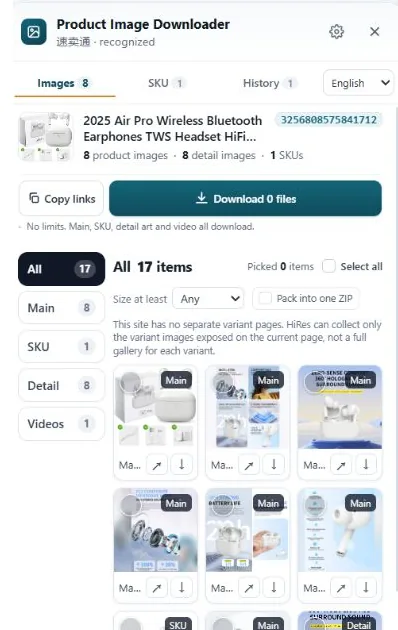
HiRes gathers the gallery, variant and detail images from Amazon, AliExpress, eBay, TikTok Shop, Temu, Etsy, Lazada and Walmart pages, in one panel. Free for individual downloads, no account needed.
Get HiRes for Chrome