
Upload the photo to Google Lens, Bing Visual Search, or TinEye and you will usually find the same item on other marketplaces, or the same photo on other listings. It works best with a clean main image, and it misses listings that use different photos of the same product.
What reverse image search actually matches
A reverse image search matches the photo, not the product. Feed it a clean main image and it finds pages using that same photo, or photos close enough to count as the same. Feed it a cropped, edited, or watermarked copy and the results get thinner. And if another seller photographed the same product themselves, their listing will not match at all, because the pixels are different even though the item is identical.
That one fact decides what the tool is good for. It is strong at finding where a photo came from and where else it is used. It is weak at proving two listings are the same product when their photos differ.
Method 1: Google Lens
Google Lens is the first tool to try for shopping. Open lens.google.com, upload the photo, or paste the image URL, and Lens returns visually similar images, plus shopping results when it recognizes the item. It indexes product pages heavily, so for a common item you will often see the same photo on Amazon, AliExpress, eBay, and a few smaller stores in one go.
Two things help the result. Use the cleanest main image you have, not a screenshot with the app interface in it. And try the photo both cropped tight on the product and as the full frame, because Lens sometimes matches better one way than the other.
Method 2: Bing Visual Search
Bing Visual Search works the same way: open bing.com/images, upload a photo, and pick the visual search option. Its shopping index is smaller than Google's, but it sometimes surfaces listings Google does not, and its "visually similar" results are good when you want lookalikes rather than the exact item.
Use it as a second opinion, not a replacement. Run the same photo through both Lens and Bing, and the overlap tells you which matches are solid, while the differences show you listings one engine indexed and the other missed.
Method 3: TinEye
TinEye is a different kind of tool. It finds exact copies of your photo across the web, and it is best at the other job: checking whether someone is using your own product photo. Upload your original file and TinEye lists the pages carrying that exact image, with the dates it first saw each one.
Its shopping index is smaller than Google's, so it is not the first choice for finding a supplier. But for spotting a stolen photo, it is the most direct tool there is, because it matches the file itself rather than guessing at similarity.
Two different jobs: sourcing vs finding stolen photos
Sourcing and enforcement look the same on the surface, upload a photo, look at the results, but they need different inputs. For sourcing, use the cleanest main image from the listing you are studying, and expect a mix of the same item and close lookalikes. Follow the matches that share the exact photo, and treat the lookalikes as leads to check, not as the same product.
For enforcement, use your own original file, the one straight from the camera or the shoot, and check every few weeks. A copy that was cropped, recolored, or re-shot may not match, so run a few versions of the photo, and keep the original files with their dates as your proof of who shot it first.
What it misses
Reverse image search has real blind spots. It misses listings that use different photos of the same product, new listings the search engine has not indexed yet, and photos behind login walls. It cannot tell you whether a seller is legit, what the real price is, or whether the photo was stolen, only that the same pixels appear somewhere else.
Use it as a starting point, not a verdict. A match is a lead to open and check. No match means the search engine has not seen that photo.
Getting a clean photo to search with
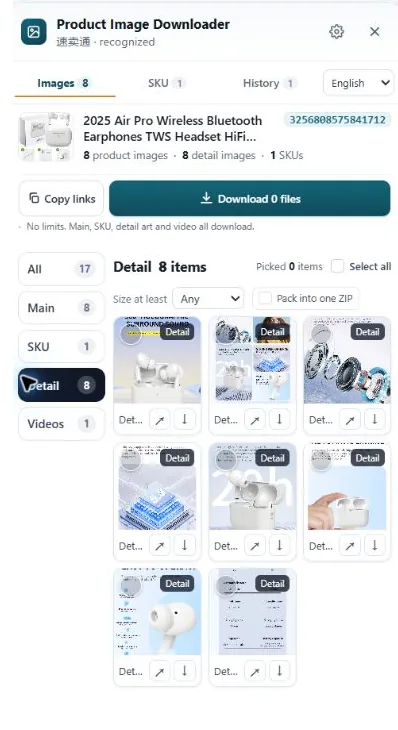
A full-size file searches better than a 500px display copy, because the search engine has more detail to match on. If the listing is on Amazon, AliExpress, eBay, TikTok Shop, Temu, Etsy, Lazada, or Walmart, HiRes pulls the full-size gallery, variant, and detail images from the page, grouped and ready to save one by one for free, with no account needed.
Save the clean main image, run it through Lens, and the results will be better than anything a screenshot gives you. Pro is $19 one-time and adds ZIP packaging, product video downloads, image resizing and JPEG quality controls, expanded batch export, and long-term history.
A note on reusing images. A reverse image search shows you where a photo appears, not who has the right to use it. Photos belong to whoever made them, so use the results for research, sourcing leads, and spotting copies of your own work. Publishing someone else's photo in your own listing without permission can get it taken down. More in our guide on when supplier photos are safe to use.
Questions people ask
Can reverse image search find a supplier for a product?
Sometimes. If the supplier's own listing uses the same photo, Lens or Bing will often surface it. If every seller shot their own photos, or the supplier only lists on sites the search engine does not index well, you will get lookalikes instead of the source. It is a lead, not a guarantee.
Which reverse image search is best for products?
Google Lens usually finds the most shopping results, because it indexes product pages heavily. Bing Visual Search is a solid second and sometimes surfaces different listings. TinEye is better for the other job: finding exact copies of your own photo across the web.
Can I reverse search a photo from my phone?
Yes. Google Lens is built into the Google app and Chrome on both iPhone and Android, and you can upload a photo from your camera roll. The results are the same as on desktop, but comparing listings is easier on a bigger screen.
Will reverse image search find my stolen product photos?
It finds exact copies of your photo when the copy is on a page the search engine has indexed. It will miss copies that were cropped, recolored, or re-shot, and listings behind login walls. Check every few weeks, and keep the original files with their dates as your proof.
Start the search with the full-size file
HiRes gathers the gallery, variant and detail images from the product page you are already on, in one panel. Free for individual downloads, no account needed.
Get HiRes for Chrome