
Marketplaces keep several sizes of every photo and show you a small one. The size is written into the URL: Amazon uses _AC_SL and _AC_SX, eBay uses s-l, Etsy uses il_, AliExpress uses a suffix you can trim. Edit it, save the bigger file, then reverse image search it.
The size code is hiding in the URL
Right-clicking a gallery photo saves the copy your browser is showing, sized for the page, not for your work. The size sits in plain sight inside the image address. Open the image in a new tab, find the size part, change it. If the pattern differs, follow what the page shows.
Amazon: change the _AC_ size code
Open an Amazon product image in a new tab and look near the end for a segment such as _AC_SL1500_ or _AC_SX569_. The letters say which shape to serve, and the number says how big. SL fixes the long edge. SX fixes the width.
Raise the number or delete the segment. Changing _AC_SL1500_ to _AC_SL2000_ often works, and deleting the segment usually returns the largest version Amazon holds. The zoom viewer loads the same large copy.
eBay: swap the s-l code
eBay gallery photos live on i.ebayimg.com, with the size at the end of the address: s-l64 for a tiny thumbnail, s-l500 for a mid-size copy, and s-l1600 for the largest version eBay commonly serves. Swap s-l64 or s-l500 for s-l1600 and load the address again.
Two catches. 1600 is the largest size eBay commonly serves, not a promise: a smaller upload returns the smaller file. Description images are a separate case, since some are hotlinked from outside hosts with no eBay size code.
Etsy: read the il_ size code
Etsy serves the same listing photo in a ladder of sizes: il_75x75 for a thumbnail, il_340x270 for a small preview, il_570xN for a medium copy, and il_794xN for the common display size. N is a height that varies with the photo.
The top of the ladder is il_fullxfull. Swap the size segment for that code and you get the full version as Etsy holds it. Work through each of the usual 10 photo slots the same way.
AliExpress: trim the size suffix
AliExpress images often carry a size suffix after the extension, such as .jpg_960x960, or a quality marker such as _Q90. That suffix tells the server to send a resized copy. Delete it and the address points at the larger file: try plain .jpg and compare.
Scroll first. AliExpress lazy-loads many images, so the gallery and description stack may not exist until you scroll to them. Choice and regular listings can also behave a little differently.
Check it with a reverse image search
Getting a bigger file is only half the job. You still need to know whether it is the real original. A bigger copy of a bad upload is still a bad upload, and a sharp-looking file can be a resized copy another seller re-uploaded. A reverse image search takes about a minute.
Run the file you saved through Google Lens or TinEye, uploading the file itself, not the page address. Does the same photo appear anywhere larger, or under a different seller? If a larger version turns up, fetch it and repeat the check. If nothing larger turns up, your file is probably the biggest version that exists.
The hard limit: the original is only as big as the upload
No URL trick can get around this: the original is the file the seller uploaded, and every copy is made from it. If the seller uploaded a 1200px photo, no edit can invent the missing pixels. Enlarging it in an editor only makes the pixels bigger, not the detail. Accept the ceiling, use the file at a size it can carry, or ask the supplier for the original.
Doing it with HiRes instead
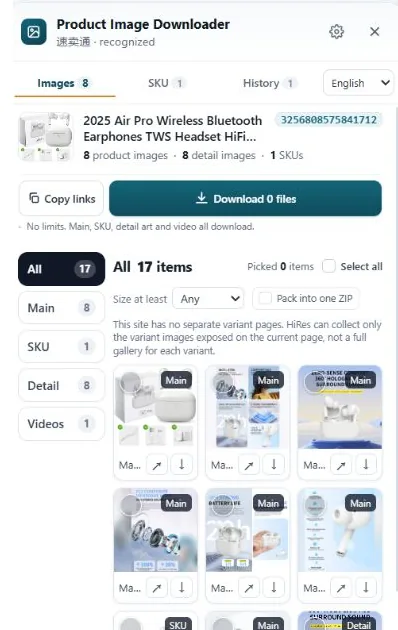
Editing URLs works, but it is slow across nine gallery photos, four colour variants and a stack of detail images. HiRes is a Chrome extension built for that page. Open a product page on Amazon, AliExpress, eBay, Etsy, TikTok Shop, Temu, Lazada or Walmart, and the panel lists what the page exposes, sorted into main gallery, variant images with their option labels, and detail images.
Individual downloads, copying image links and unlimited product pages are free, with a 3-day download history and no account needed. The $19 one-time Pro purchase adds ZIP packaging, product video downloads, image resizing and JPEG quality controls, expanded batch export and long-term history. Everything runs locally. One limit applies here too: HiRes can only save what the page actually loads.
A note on reusing images. Finding the original and having the right to publish it are two different things. Brand and supplier photos belong to whoever created them. Downloading for research and comparison is normal seller work, but putting someone else's photo in your own live listing without permission can get it taken down. See our separate guide on when supplier photos are safe to use.
Questions people ask
What does "original product image" actually mean?
It means the largest file the seller uploaded, before the marketplace made smaller display copies. The page you see loads one of those smaller copies. The original is the file at the top of that stack, and it is only as big as the upload.
Can I always get a bigger image by editing the URL?
No. Editing the size code only asks the server for a different copy of the same upload. If the seller uploaded a 1200px file, the biggest copy you can reach is 1200px. The trick works when the page shows you a small copy of a large upload, and it does nothing when the upload itself was small.
How do I know I found the real original and not a copy?
Open the file you saved, look at its pixel size, then run it through a reverse image search such as Google Lens or TinEye. If the same photo turns up larger somewhere else, or under a different seller, you are looking at a copy. If nothing larger turns up, you probably have the biggest version that exists.
Why does the same product photo look different on each marketplace?
Each marketplace keeps its own set of sizes and its own compression. One site may show you a 1600px copy while another shows a 500px copy of the same upload, and the two files can look quite different. The upload is the same. The copies the sites serve are not.
Skip the right-click routine
HiRes gathers the gallery, variant and detail images from the product page you are on, in one panel. Free for individual downloads, no account needed.
Get HiRes for Chrome