
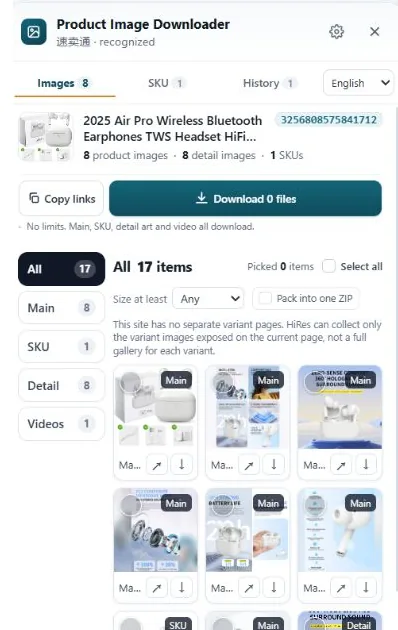
Walmart streams product videos, so right-click cannot save them. The reliable routes are the browser's developer tools, which show the video file the page loads, and screen recording as a fallback. HiRes Pro can also pull product videos from Walmart listings into one panel, with the files saved straight to your Downloads folder.
Where Walmart puts product videos
Not every Walmart listing has a video. The ones that do usually show it in the image gallery, as a thumbnail with a play icon, or in a video strip further down the page. Brand videos and how-to clips sit in the same places. If a listing has no play icon in the gallery, it probably has no video, and no tool will find one.
Videos matter for research because they show movement, scale and texture that still photos hide. A bag that looks stiff in photos might be soft in video. That is why sellers save them: to study a competitor's product, or to keep a record of how a supplier presents an item.
Method 1: find the video file with developer tools
This is the method that gets you the actual file. In Chrome, press F12 to open DevTools and click the Network tab. In the filter box, type mp4, then reload the product page and play the video. The video file shows up as a row in the list, usually ending in .mp4.
Right-click that row and choose "Open in new tab". The video plays on its own page, and the three-dot menu in the player gives you a Download option. Save it, then check the file size: a real product video is usually several megabytes. If the row is only a few kilobytes, it is a preview segment, not the full video, and you need to let the video play longer so the full file loads.
If no mp4 row appears, try filtering by "media" instead, or check the page source with Ctrl + U and search for .mp4. Some Walmart videos load through a player that splits the file into pieces, and those are much harder to save by hand. That is the point where the next methods earn their keep.
Method 2: screen recording as a fallback
When the file will not come out cleanly, record the screen while the video plays. On Windows, press Win + G to open the Game Bar, or use the Snipping Tool's video mode, and capture the player area. On a Mac, press Cmd + Shift + 5 and choose the recording option. Play the video at full screen for the sharpest result.
A recording is never as clean as the original file. It caps out at your screen resolution, it picks up any stutter in playback, and it records the player controls if you leave the mouse over the video. Mute the system sound first if you only want the picture. Use recordings for reference, and use the real file whenever you can get it.
Doing it with HiRes
HiRes Pro includes product video downloads on the marketplaces it supports, Walmart included. Open a Walmart product page, click the HiRes button, and the panel lists the videos the page exposes alongside the gallery images. Tick the ones you want and save them, or package a set as a ZIP. Pro is $19 once, with no subscription, and individual image downloads stay free.
The same honest limit applies as everywhere else: HiRes can only save what the page actually loads. A video that needs a login, or one that streams in pieces the browser never assembles into a single file, may not appear in the panel. When it does appear, it is the file itself, not a recording of your screen.
A note on reusing videos. A product video belongs to the seller or brand that made it. Saving it to study a product is normal research. Publishing it in your own listing without permission can get the listing removed, and video complaints tend to move faster than photo ones. Get written permission, or shoot your own.
Questions people ask
Do all Walmart listings have videos?
No, only some do. Listings with a video show a play icon on a gallery thumbnail or a video strip further down the page. If there is no play icon, the listing has no video to download.
Why can't I right-click a Walmart video to save it?
Walmart streams its videos through a player instead of linking to a plain file, so the browser's save menu has nothing to grab. You need to find the video file in the Network tab of DevTools, record the screen, or use a tool that reads the page for you.
What quality are Walmart product videos?
It depends on what the seller uploaded. Most product videos are 720p or 1080p, and the file you download matches what the player streamed. A recording of the screen will be softer than the original file, so download the file itself when you can.
Can I download Walmart videos with HiRes?
Yes, with HiRes Pro. Open the Walmart product page, click the HiRes button, and the panel lists the videos the page exposes. Video downloads and ZIP packaging are part of Pro at $19 once. Individual image downloads are free.
Skip the right-click routine
HiRes gathers the gallery, variant and detail images from the Walmart page you are already on, in one panel, and Pro adds the product videos. Free for individual downloads, no account needed.
Get HiRes for Chrome