
Etsy lets sellers attach photos to variations, so picking an option can swap the gallery to that option's photos. But the page does not always expose which photo belongs to which option, and some sellers never link them at all. Click each option and watch whether the gallery changes. That is the only reliable test.
How variation photos are supposed to work
An Etsy listing has ten photo slots. A seller who offers variations, colour, size, material, can attach specific photos to each variation, so a shopper who picks "sage green" sees the sage green photos and a shopper who picks "terracotta" sees the terracotta ones. The photos come out of the same ten slots, so a listing with four colours and two photos each has already used eight slots before any detail shots.
When it works, it is obvious: click an option, and the main photo changes, the thumbnails reshuffle, and the gallery clearly belongs to that option. This is how a good Etsy seller shows four colourways without writing "sage green shown in photo 3" in the description. The buyer sees the thing they are about to pay for, and the seller gets fewer "wrong colour" messages.
When it does not work, it is also obvious, but for the wrong reason: click every option, and the gallery never changes. Either the seller never linked photos to the variations, or the page is not exposing the link. Both look identical from the outside, and both leave you guessing which photo goes with which option.
Where the mapping breaks
The mapping breaks in three places, and they are worth telling apart:
- The seller never linked them. This is the common one. Linking photos to variations takes a few extra clicks per option, and many sellers skip it, especially on listings with a dozen variations. The photos exist, the options exist, and nothing connects them. Message the seller and ask which photo is which, or buy only if the description names the photos.
- The page does not expose the mapping. Some listings link photos to options in Etsy's system, but the page a visitor loads does not carry that link in a form a browser or a tool can read. The gallery may still swap when you click, or it may not. The information is missing from the page itself, not from your browser.
- One photo covers several options. A seller with ten slots and eight variations cannot give each option its own photo. They reuse one lifestyle shot across options, or show a group photo and let the buyer pick. That is a fair choice, but it means no photo is "the" photo for any single option.
The practical test is the same in all three cases: click each option, one at a time, and watch the gallery. If it swaps, the mapping is live and you can trust what you see. If it never moves, treat every photo as unlabelled and ask the seller before you buy or copy anything.
Getting the full-size file
Etsy serves several sizes of every photo. Open a listing photo in a new tab and look at the URL: you will see a size segment like il_794xN, which is a common display size, or il_570xN in search results. The full-size version uses il_fullxfull in the same spot. Swap the segment, press Enter, and save the file that loads.
One honest caveat: the full size is only as big as the original the seller uploaded. Etsy is a handmade and vintage marketplace, and plenty of sellers upload phone photos. If the original is 1000px, the "full size" is 1000px, and no URL trick changes that. Check the pixel size of the file you saved before you use it for anything.
Doing it with HiRes instead
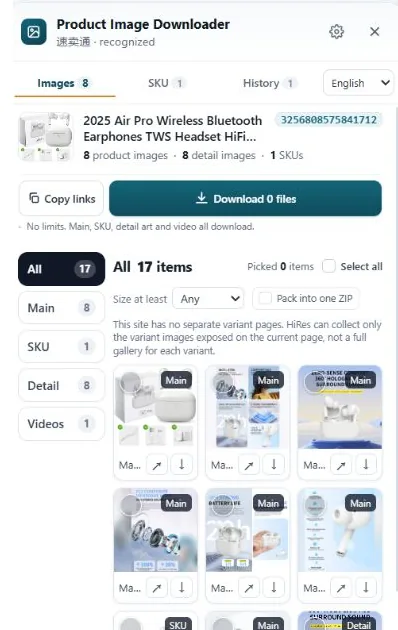
HiRes is a Chrome extension built for Etsy listing pages. Open any listing, click the HiRes button in the corner, and the panel lists what the page exposes, already sorted: main gallery in one group, variation images with their option labels in another, detail images in a third. Tick what you need and save the files individually, or package a bigger selection as a ZIP (that part is in Pro, $19 once; individual downloads are free with no daily cap).
The labelling rule matters here, so here it is plainly: HiRes labels a variation photo with its option only where the page provides the mapping. Where Etsy does not expose which option a photo belongs to, HiRes leaves those photos unlabeled rather than guessing. A wrong label is worse than no label, because a wrong label sends the wrong photo to your listing. Everything runs locally in your browser, and the images go from Etsy's servers straight to your Downloads folder, never through us.
A note for Etsy sellers. If you sell in several colours, link a photo to every variation you actually sell. It takes minutes, it cuts "which colour is this" messages, and it is the difference between a buyer who trusts the photo and a buyer who scrolls past. Use the ten slots on the options first, and put the lifestyle shots in the description or your shop banner instead.
Questions people ask
How do Etsy variation photos work?
A seller can attach specific photos to each variation, such as a colour or size, so picking an option shows its own photos. Etsy has ten photo slots per listing, and variation photos come out of that same ten. The gallery swaps when you pick an option, but only if the seller linked photos to it.
Why can't I tell which Etsy photo belongs to which option?
Because the page does not always expose the mapping. Some listings link photos to options clearly, and the gallery swaps as you click. Others show all ten photos no matter which option you pick, and nothing on the page says which photo goes with which colour. The information is missing from the page itself, not from your browser.
How do I download the full-size version of an Etsy photo?
Open the photo in a new tab and look at the URL. Etsy serves several sizes, and il_794xN is a common display size while il_fullxfull is the full one. Change the size segment to il_fullxfull and save the file that loads. If the seller only uploaded a small original, the full size is that small file.
Does HiRes label Etsy variation photos?
Only where the page provides the mapping. HiRes groups an Etsy listing's photos and labels variation images with their option where the page exposes it. Where Etsy does not expose which option a photo belongs to, HiRes leaves those photos unlabeled rather than guessing.
Skip the right-click routine
HiRes gathers the gallery, variant and detail images from the Etsy page you are already on, in one panel. Free for individual downloads, no account needed.
Get HiRes for Chrome