
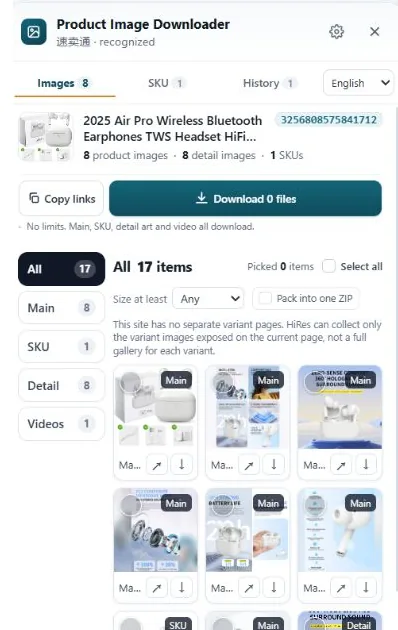
Yes. You can save images from most Shopify stores with a right-click, or from the page source. HiRes does not support Shopify yet, so it cannot do this step for you. A web tool called ExtractPics can, and the manual steps below need no install.
Yes, you can download images from a Shopify store. The photos load in your browser like any other web image, so you can save them, though some themes make right-click harder and the file you save may be a smaller copy.
How Shopify stores serve their images
Shopify stores run on themes, and each theme decides how product photos appear. Most themes show a gallery, load extra photos only as you scroll, and serve each image from Shopify's CDN at a size the theme requests. That size often sits in the image URL as a width value, such as ?width=800, so the file your browser shows is a resized copy of the original upload.
Some themes also turn off the right-click menu on product photos. That stops a quick right-click save, but it does not stop the image from loading. The file still arrives in your browser, and the methods below reach it anyway. What no method can do is improve on the original upload: if the seller uploaded a 1200px photo, 1200px is the largest version that exists.
Method 1: right-click and save
Start with the easy path. It works on most stores:
- Open the product page and click through the gallery so each photo loads.
- Right-click the photo and choose Save image as.
- Check the saved file size before you move on. A file under 100 KB is often a small display copy.
- If the menu does not appear, the theme has blocked it. Move on to Method 2.
This is fine for one or two photos. For a full gallery it gets slow, and you still have to check each file by hand.
Method 2: pull the full-size file from the page source
When right-click fails, or the saved file looks soft, go to the source:
- Right-click a blank part of the page and choose View page source, or press Ctrl+U.
- Search the source (Ctrl+F) for cdn.shopify.com. Each product photo appears as a full URL.
- Look for a width value in the URL, such as ?width=800. Change that number to a larger one, or remove the width part and load the URL to see the full-size file.
- Save the image from that tab.
A second route uses the browser developer tools. Press F12, open the Network tab, reload the page, and filter by Img. Click any image request to open it at full size. This route takes more clicks, but it shows you exactly which files the page loaded.
Method 3: get the whole gallery as a ZIP with ExtractPics
If you need every photo from a page and do not want to save them one by one, ExtractPics is a website tool built for this job. Paste the product URL, let it render the page in a real browser, and it returns the images as a ZIP file. It works on many store types, including Shopify stores, and needs no install.
That is the gap HiRes does not fill yet. HiRes works on Amazon, AliExpress, eBay, TikTok Shop, Temu, Etsy, Lazada and Walmart, where its panel groups main, variant and detail images for you. Shopify is not on that list, so for a Shopify page, use ExtractPics or the manual steps above.
A note on reusing images. Downloading a photo and having the right to publish it are two different things. Product photos belong to the seller or brand that made them. Saving them for research and supplier comparison is normal work, but putting them in your own live listing without permission can get the listing taken down. Get written permission, or shoot your own photos, for anything customer-facing.
Questions people ask
Can you download images from any Shopify store?
In most cases, yes. The photos load in your browser, so you can save them with a right-click or from the page source. A few themes block right-click, and a store behind a password page shows nothing at all until you log in. In both cases the page source still shows what the page loaded, once you can see the page.
Why is the image I saved so small?
Shopify serves each photo at the size the theme asks for, often 800 or 1200 pixels wide. The width value sits in the image URL, so opening the same URL with a larger width, or with the width part removed, usually returns the bigger file. If the upload itself was small, that is the largest version there is.
Can I use Shopify store images in my own store?
Downloading a photo and having the right to publish it are two different things. Product photos belong to the seller or brand that created them. Sellers commonly download images for research, specs and comparison, but reusing them in a live listing without permission can get the listing taken down. Get permission or shoot your own for anything customer-facing.
Skip the right-click routine
HiRes gathers the gallery, variant and detail images from the page you are already on, in one panel. Free for individual downloads, no account needed.
Get HiRes for Chrome