
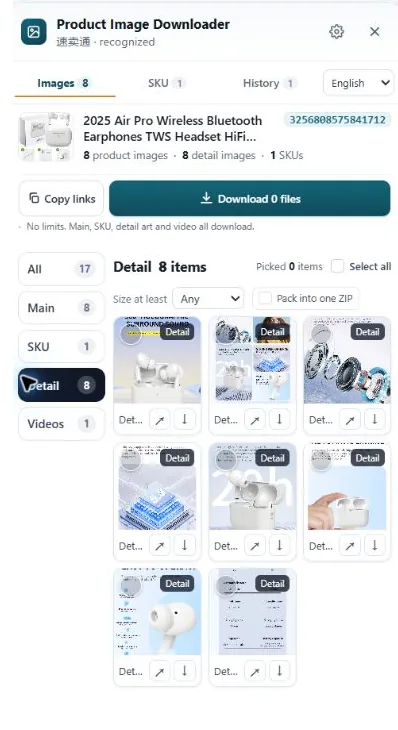
Yes, you can save images from a 1688 product page by hand, with right-click, page source, or the Network panel in developer tools. HiRes does not support 1688.
Yes, you can download images from 1688. Open the product page in a desktop browser and save the photos the page loads, one at a time, with the manual methods below. HiRes does not work on 1688.
1688 is not AliExpress
People mix the two up because both belong to Alibaba, but they serve different buyers. 1688 is the domestic wholesale site for the China market: a Chinese interface, minimum order quantities, and pages built for buyers who want a supplier. AliExpress is the retail site for overseas buyers, in English, selling in small quantities.
The two sites also run different image systems and page structures, so a trick that works on AliExpress may not work the same way on 1688. If your supplier also lists the product on AliExpress, that page is often easier, and HiRes supports it.
How to save 1688 images by hand
A 1688 listing carries three sets of images: the main gallery, a SKU photo for each spec option, and a long stack of detail images further down. Three manual methods cover them:
- Right-click save. Click a gallery thumbnail, right-click the photo, and save. Repeat for each spec option, since a SKU photo only loads once you select it. This fails when a page blocks right-click, or when the file is a small display copy.
- View page source. Press Ctrl+U, then search for
.jpg,.png, or.webp. Copy an image URL into a new tab and save it there. It works, but the source is long and full of thumbnails. - Developer tools, Network panel. Press F12, open the Network tab, filter by Img, then reload the page. Scroll slowly to the bottom so every detail image loads, and click each spec option so its SKU photo loads too.
What you will actually get
Two limits shape the result. The first is lazy loading: images below the fold only load after you scroll to them, and SKU photos only load after you click their option. Save too early and you will end up with the gallery only, missing the size chart.
The second is the login wall. Some 1688 pages ask you to sign in, or show a verification step, before the full gallery and detail stack load. When that happens, you can only save what the page actually shows. Exact sizes vary by listing too: the file you save is often a display copy, and no method adds pixels that were never there.
Doing it with HiRes
To be clear: HiRes does not support 1688. It works on eight sites, Amazon, AliExpress, eBay, TikTok Shop, Temu, Etsy, Lazada, and Walmart. On those pages, the panel groups the images into main, variant, and detail, and you can save files one by one for free, with no account needed. Pro is $19 one-time and adds ZIP packaging, product video downloads, image resizing and JPEG quality controls, expanded batch export, and long-term history.
That leaves 1688 as a manual job. If the same supplier lists the product on AliExpress, open that listing instead, and HiRes will list the gallery, SKU, and description images.
A note on reusing images. Supplier photos belong to the supplier who made them. Downloading them to study a product and compare suppliers is normal research work. Publishing them in your own listing without permission can get a listing taken down or draw a complaint. Get written permission and keep the record. More in our guide on when supplier photos are safe to use.
Questions people ask
Does HiRes download images from 1688?
No. HiRes works on Amazon, AliExpress, eBay, TikTok Shop, Temu, Etsy, Lazada, and Walmart. It does not work on 1688. For 1688 pages, use the manual methods in this guide: right-click save, page source, or the Network panel in developer tools.
Why do some 1688 images save so small?
The file you right-click is often a display copy, smaller than the original the supplier uploaded. Some suppliers also upload modest files to begin with, and no method adds resolution that was never there. Check the pixel size of the saved file, and judge each listing by the size the page actually shows.
Can I use 1688 supplier photos in my own store?
Downloading a photo and having the right to publish it are two different things. If the supplier agreed to supply you with their photos, keep proof of that agreement. If you have no relationship with the seller, use the photos for research only. Republishing them without permission risks takedowns and complaints from whoever owns them.
Your supplier also lists on AliExpress?
HiRes gathers the gallery, variant and detail images from the AliExpress page you are already on, in one panel. Free for individual downloads, no account needed.
Get HiRes for Chrome